
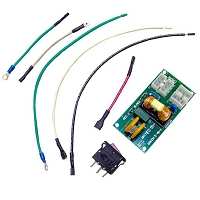
The replacement board fits physically, but the wire terminals or connectors are different. Can I still use it?
Do not use a replacement garage opener circuit board just because it physically fits. Different wire terminals or connectors can mean the board uses different voltage paths, motor logic, sensor inputs, wall-control communication, harness pinouts, battery backup wiring, or receiver logic. Use it only if it is a documented replacement or verified supersession.
Physical Fit Does Not Prove Electrical Compatibility
A garage door opener circuit board may slide into the same plastic end panel, line up with the same mounting holes, and still be the wrong board. Manufacturers may reuse similar housings across multiple opener generations, but the internal circuit design, firmware, connector assignments, and terminal functions can change.
This is one of the biggest replacement-board traps. A plug may fit. A screw terminal may look close. The learn button may sit in the same area. None of that proves the board is safe to wire into the opener. The replacement must match the opener model, board number, manufacture date, voltage, motor type, drive platform, safety sensor circuit, wall control type, and verified service-kit path.
Different Terminals Usually Mean Stop and Verify
If the old board has one terminal layout and the new board has a different layout, do not move wires by position alone. Terminal order can change. A wire that connected to a wall-control input on one board may land on a safety sensor input, accessory common, lock output, or data terminal on another board.
Low-voltage terminals are especially easy to misread because they often handle wall controls, photo eyes, external receivers, and accessory commands. Incorrect wiring can cause no-close problems, flashing lights, dead wall controls, failed remote operation, damaged sensors, or a shorted board input.
Harness Plugs Can Look Similar but Carry Different Signals
Motor harnesses, transformer plugs, RPM sensor leads, travel module connectors, light socket plugs, battery backup connectors, lock leads, and Wi-Fi or camera connectors may use similar plastic shapes. A connector that physically snaps into place can still have a different pinout or signal assignment.
On one board, a plug may carry motor feedback. On another revision, a similar plug may carry battery charging, travel sensing, or accessory data. Forcing a harness match can damage the replacement board, motor circuit, sensor circuit, or connected accessory. Do not trim, splice, or repin harnesses unless the manufacturer’s replacement kit specifically instructs it.
Adapter Harnesses and Service Kits Are Different
There is one important exception: some legitimate replacement boards are sold as service kits. A service kit may include an adapter harness, revised end panel, mounting bracket, label, antenna lead, wall control, or updated instructions. In that case, the connectors may differ because the board is a verified supersession, and the included adapter parts create the proper compatibility path.
The key word is verified. A documented supersession is not the same as a board that looks close. If the kit instructions show how the new terminals or harness adapters map to the old opener, the board may be usable. If no documentation confirms the connector change, stop and match the original board number again.
Safety Sensor and Wall Control Logic May Change
Modern garage openers depend on monitored safety reversing sensors. If the replacement board has different safety sensor terminals or different monitored sensor logic, the opener may open but refuse to close. The lights may flash, the sensor LEDs may behave incorrectly, or the opener may require constant-pressure closing.
Wall controls also vary. A basic push button, multifunction console, motion-detecting wall control, smart wall panel, timer-to-close console, lock-capable control, or wireless wall control may not communicate with every board. If the connector or terminal format changed, verify the wall-control type before assuming the new board is correct.
AC, DC, Battery Backup, and Wallmount Boards Need Extra Care
AC and DC garage openers use different motor-control designs. Battery-backup units add charging circuits and battery leads. Wallmount and jackshaft openers may add cable tension monitor, automatic lock, door-position feedback, and shaft-position logic. These circuits are not interchangeable just because the board can be mounted in the opener.
A wrong board may click, power the lights, or respond to the wall button but still fail motor movement, travel setup, safety monitoring, receiver programming, lock output, or battery charging. If the connector layout is different and no service-kit documentation explains why, treat the board as unverified.
What Can Happen If You Wire It Anyway?
Installing a board with unmatched terminals or connectors can create several problems. The opener may be dead, move only a few inches, reverse immediately, flash safety errors, refuse remote programming, lose wall-console communication, or damage connected sensors and accessories. In some cases, the new board can be damaged as soon as power is applied.
Miswiring is especially risky after storm damage. A surge-damaged wall-control wire, shorted sensor wire, or burned transformer path can already be present. Connecting an incorrect board to questionable wiring adds another failure variable and makes diagnosis harder.
Technician’s Corner
Technical Field Note: Connector Shape Is Not a Wiring Diagram
A matching plug housing does not confirm matching pin function. Before connecting a harness, verify what each pin is supposed to carry: motor output, sensor power, wall-control data, transformer voltage, battery charging, travel feedback, or accessory command.
Technical Field Note: South Florida Corrosion Can Hide Terminal Labels
In humid, storm-prone garages, terminal labels can fade or corrode. Take clear photos before removing the old board. Corrosion around low-voltage terminals can also make a wiring problem look like a board problem.
Technical Field Note: Supersession Parts May Require Every Included Piece
If a replacement kit includes an adapter harness, end panel, bracket, or updated wall console, those pieces may be required. Leaving them out can make a correct supersession behave like the wrong board.
Technical Field Note: Do Not Convert by Guessing
Do not move wires by color, terminal location, or “closest matching” connector. Garage opener brands and generations do not all assign the same colors or connector positions to the same functions.
Before You Choose a Replacement Part
- Compare the old board part number with the replacement board or service-kit number.
- Confirm the opener model number, manufacture date, drive type, motor type, and voltage.
- Verify whether the replacement is an exact board, service kit, or documented supersession.
- Check whether adapter harnesses, end panels, brackets, or wall controls are required.
- Compare safety sensor terminals, wall-control terminals, antenna routing, and receiver logic.
- Confirm battery backup, lock, Wi-Fi, LED lighting, RPM sensor, travel module, and motor harness compatibility.
- Do not apply power if the connector or terminal mapping is uncertain.
Related Technical Categories
Final Matching Advisory
If the replacement board physically fits but the wire terminals or connectors are different, do not assume it can be used. Verify the model number, board part number, voltage, frequency, connector type, harness pinout, learn button color, receiver generation, safety sensor circuit, wall-control type, motor type, drive platform, service-kit contents, and operator generation before connecting replacement hardware.


