
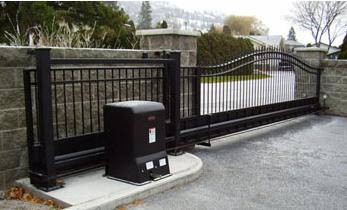
How do I manually open a slide gate during a power outage or operator failure?
To manually open a slide gate during a power outage or operator failure, first identify the exact operator's manual-release or disconnect system. Stop the gate, keep the travel path clear, and follow the model-specific power-isolation and release procedure. Depending on the design, a keyed release, clutch, handle, or drive disconnect may free the gate for manual movement.
Do Not Force the Gate Before Identifying the Release System
A powered slide gate is mechanically connected to an operator through a chain, sprocket, clutch, gearbox, rack, drive wheel, or another model-specific drive arrangement. Trying to push the gate while that drive remains engaged can load the gearbox, chain hardware, clutch, or gate frame.
The first step is identifying the operator model and locating its manual operation instructions. The release may be behind a locked cover, on the operator chassis, or incorporated into a clutch or drive assembly. Some systems use a keyed disconnect. Others use a T-handle, lever, toggle handle, or another release mechanism.
Do not assume the release procedure from one slide operator applies to another. Even visually similar enclosures may use different drive and security arrangements.
Technical Field Note: Use the release only when the gate is stopped
Manual-release instructions commonly warn against operating the emergency release while the gate is moving. Keep people, vehicles, and loose objects away from the gate path. A heavy slide gate can continue moving if the site has grade, poor stops, damaged hardware, or unusual mechanical conditions.
Check Whether Battery Backup Will Move the Gate First
A power outage does not automatically mean the gate must be manually disconnected. Some DC slide gate operators use battery backup and can continue operating after AC power is lost. Depending on the exact controller and programming, the system may continue responding to access commands or may have a configured power-failure behavior.
Battery backup and manual release are separate features. A gate may have batteries but fail to move because the batteries are discharged, a charger has failed, the operator has entered a shutdown condition, or the drive system has a mechanical problem.
Before assuming that AC failure is the only issue, check the control-board display, diagnostic LEDs, audible alarm, and battery indicators where provided. Follow the exact operator manual before resetting a shutdown or cycling the system.
Technical Field Note: A dead keypad does not prove the operator batteries are dead
Access-control equipment may use a different power supply from the operator. During an outage, the gate operator may still have battery power while a keypad, telephone entry system, receiver, or other activation device has lost power. Separate the gate power problem from the access-control power problem.
Use the Exact Manual Disconnect or Emergency Release
Once powered operation is unavailable and the gate is completely stopped, follow the operator's published manual-release procedure. The mechanism must disengage the gate drive sufficiently for the gate to move by hand.
On some operators, a keyed mechanism releases a clutch or internal disconnect. Other designs use a manually operated handle or drive-wheel release. Certain release systems may automatically enter a manually operable condition after power loss, while security-oriented configurations may require the operator enclosure or release mechanism to be physically unlocked first.
This fail-safe versus fail-secure distinction matters. Do not assume that turning off power should automatically free every gate. A system designed to remain mechanically secured during a power failure may still require its correct release key or manual unlocking procedure.
What if the Gate Is Still Hard to Push After Release?
After the drive is correctly disengaged, the gate should move with reasonable manual force for its size and construction. A very heavy gate will not feel like a lightweight residential gate, but extreme resistance is a warning that the gate or release may not be functioning correctly.
Check whether the release fully disengaged. Then inspect the gate mechanically. Damaged wheels, bent V-track, seized bearings, tight guide rollers, cantilever roller problems, debris, a sagging gate frame, or a physical obstruction can make manual movement difficult.
Technical Field Note: A manual-release complaint can expose the original failure
If the gate remains extremely difficult to move after the operator is correctly disconnected, the original "operator failure" may actually have started with gate drag. The motor and gearbox may have been trying to move a mechanically restricted gate before the system finally stopped.
Do not apply excessive force or attach a vehicle to pull the gate. Correct the mechanical condition before returning the operator to powered service.
Do Not Randomly Disconnect the Drive Chain
Some chain-driven slide gates can be separated from the drive by disconnecting chain hardware, but that should not be treated as the normal first procedure when the operator has a designed manual release.
Chain tension, gate brackets, master links, and return assemblies are operator-specific. Releasing the wrong connection can leave a heavy gate uncontrolled or create reassembly and alignment problems.
If the manual-release mechanism is damaged or inaccessible, identify the exact operator and drive arrangement before removing chain, rack, clutch, or sprocket hardware.
Re-Engage the Operator Correctly Before Restoring Service
When power or operator function has been restored, return the release mechanism to the normal operating position according to the manual. Some designs reconnect automatically when the release handle returns. Others require the clutch, drive wheel, keyed disconnect, or release assembly to be manually re-engaged.
Clear the gate path before applying an open or close command. Confirm that the operator actually transfers motion to the gate and that the gate follows its normal travel and limit logic.
If the control board, batteries, or operator were disconnected during the outage, check whether the exact model requires a reset, limit verification, position relearn, or diagnostic review. Do not assume every operator retains or restores travel information in the same way.
Plan Emergency Access Before the Next Outage
The manual-release key or access method should be identified before an emergency. Property managers, HOAs, businesses, and controlled facilities should understand how the specific gate behaves when AC power fails and whether operator batteries also power the required access devices.
Emergency access equipment, fire access arrangements, fail-safe logic, and fail-secure logic are site-specific. A manual release is not a replacement for planning how authorized access will be maintained during an outage.
Technical Field Note: South Florida outages can involve more than lost AC power
After lightning, flooding, or a major storm, inspect for water intrusion, surge damage, damaged track, fallen debris, and gate-frame movement before assuming the system only lost utility power. Restoring AC to a wet or mechanically damaged operator can create a second failure.
Before You Manually Open a Slide Gate
- Identify the exact operator model and generation.
- Confirm that the gate is completely stopped.
- Keep people and vehicles out of the travel path.
- Check whether battery backup can still operate the gate.
- Follow the model-specific AC and battery isolation instructions.
- Locate the correct keyed release, handle, clutch, or drive disconnect.
- Do not force the gate while the operator drive remains engaged.
- Check gate wheels, track, rollers, guides, and obstructions if manual movement is difficult.
- Re-engage the release according to the manual before restoring automatic operation.
- Verify limits, diagnostics, and safety-device operation before returning the gate to normal use.
Technician's Corner
The key diagnostic question is whether the gate is still mechanically connected to the operator. If the drive remains engaged, pushing harder is not the correct answer. Identify the release system first.
Also separate a utility-power failure from an operator failure. A battery-backed operator may still be capable of moving the gate, while a failed keypad or access device prevents the open command from reaching the board. Conversely, a control board may have power while a failed clutch, gearbox, or drive mechanism prevents gate movement.
Manual release parts are not universal. Verify the model number, operator generation, release mechanism, clutch or disconnect design, and any required key or handle before selecting replacement hardware.
Related Technical Categories
Slide Gate Openers
Gate Opener Replacement Parts
Gate Opener Circuit Boards
Gate Operator Batteries and Chargers
Slide Gate Chains and Drive Hardware
Before selecting replacement hardware, verify the operator model number, part number, voltage, frequency, connector type, manual-release design, battery configuration, and operator generation. Match release keys, handles, clutches, disconnect assemblies, chains, and control components to the exact operator documentation before replacement.
