
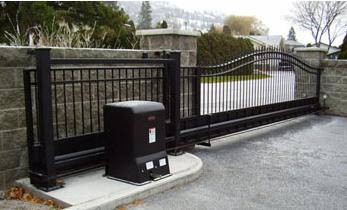
Can worn hinges, rollers, chains, gate tracks, exposed guides, or missing screening create hazards that electronic safety sensors cannot correct?
Yes. Worn hinges, rollers, chains, tracks, exposed guides, and missing screening can create crushing, shearing, draw-in, derailment, and reach-through hazards that electronic sensors cannot correct. Photo eyes and safety edges can detect certain obstructions, but unsafe gate construction, unstable movement, exposed drive hardware, and excessive mechanical resistance must be repaired or physically guarded.
Electronic Sensors Do Not Replace Safe Gate Construction
Monitored photo eyes and safety edges are important entrapment-protection devices, but they work only within their defined detection areas. A photo eye protects the plane of its beam. A contact edge protects the surface where it is installed. Neither device can hold a sagging gate upright, keep a wheel on a damaged track, cover an exposed sprocket, or prevent someone from reaching through an unscreened slide gate.
Automated vehicular gates should be evaluated as complete mechanical and electrical systems. The gate must remain stable, move freely through full travel, have suitable stops and retention hardware, and prevent access to reachable pinch or draw-in points. Sensors supplement these safeguards; they do not make defective hardware acceptable.
How Worn Swing-Gate Hinges Create Hazards
Worn hinge pins, bearings, welds, brackets, or posts can let a swing gate sag, twist, or change its travel path. The leading edge may drag the pavement, strike a stop incorrectly, or move closer to a wall or column than it did when the safety layout was established. A loose upper hinge can also allow the gate to lean or separate from the post.
Mechanical drag may trigger the operator’s inherent obstruction sensing, causing nuisance stops or reversals. Increasing force to overcome worn hinges can reduce the available safety margin. The gate should remain properly supported and move smoothly by hand when released according to the operator instructions.
Rollers, Wheels, Tracks, and Guides Need Mechanical Protection
Slide-gate wheels and tracks carry and guide substantial moving weight. Worn V-wheels, damaged bearings, bent track, loose anchors, debris, settlement, or misaligned guide rollers can make the gate climb, bind, derail, or shift sideways. A photo eye may detect a person in the driveway but cannot prevent the gate from leaving the track or falling toward an adjacent area.
Guide rollers, cantilever rollers, brackets, and receiver posts can create pinch and shear points wherever the moving frame passes a fixed component. Exposed rollers should be guarded as required, and the gate should have appropriate physical stops and retention features so it cannot overtravel or fall if a roller or guide fails.
Chains, Sprockets, and Racks Create Draw-In Hazards
A loose chain can whip, climb a sprocket, rub a cover, or pull unevenly on the gate. Exposed chain-and-sprocket assemblies can draw in clothing, fingers, tools, or debris. Rack-and-pinion systems create similar pinch points where the gear engages the rack. These hazards should be covered or made inaccessible rather than relying on an optical sensor located elsewhere.
Chain tension should match the operator instructions. Overtightening can overload bearings and shafts, while excessive slack can cause jumping, impact, and inconsistent limits. Damaged chain brackets, master links, idlers, rack sections, or mounting hardware should be corrected before force or limit settings are adjusted.
Missing Screening Creates Reach-Through Hazards
An open-pattern slide gate moving beside a stationary fence can allow a person to reach through the gate and contact rollers, chains, guides, or the moving fence-overlap area. A driveway photo eye may remain completely clear while an arm or hand is inside the hazardous space.
Automated slide-gate construction commonly requires guarding or screening from the bottom of the gate to at least 6 feet above grade so a 2-1/4-inch sphere cannot pass through reachable openings in the gate and the adjacent fence area covered by the open gate. Confirm the current gate-construction standard and local requirements for the exact site.
Mechanical Defects Can Distort Sensor and Force Performance
A binding gate changes the load seen by the operator. The control board may interpret worn rollers, track debris, hinge drag, wind pressure, or chain bind as an obstruction. Conversely, force settings raised to overcome those problems can allow greater force before the operator reacts to a real obstruction.
Mechanical movement can also alter sensor coverage. A sagging gate may cross a photo-eye beam, pull on a moving-edge cable, change the distance to a fixed post, or compress a safety edge during normal travel. The sensor fault is then a symptom of a mechanical problem, not necessarily a defective electronic device.
Technician’s Corner
Test the Gate Manually Before Adjusting Electronics
With power isolated and the operator released as directed, the gate should move through full travel without binding, sudden weight changes, derailment, or contact with the ground. Correct mechanical resistance before changing force, speed, or sensor settings.
South Florida Exposure Accelerates Wear
Salt air, humidity, irrigation, wind-driven rain, and storm debris can corrode hinge pins, roller bearings, chain hardware, track anchors, and guide brackets. Wind load on solid gates can also flex posts and increase dynamic clearances or contact forces.
Small Alignment Changes Can Create Large Hazards
A guide roller shifted a fraction of an inch can move a long slide gate substantially at the leading edge. A worn hinge can change the sweep path enough to create a new wall-side crush zone. Reevaluate sensor placement after mechanical repairs.
More Sensors Do Not Fix an Unstable Gate
Adding beams or edges is not a substitute for repairing a gate that can fall, derail, overtravel, or expose moving drive hardware. Eliminate or guard the mechanical hazard first, then protect the remaining entrapment zones with approved monitored devices.
Before You Replace or Add Safety Hardware
- Inspect hinges, welds, posts, rollers, bearings, tracks, chains, racks, guides, and stops.
- Confirm the gate remains upright, retained, and stable through complete travel.
- Check for reachable pinch, shear, draw-in, and fence-overlap areas.
- Verify required screening, roller guards, chain covers, and filler panels.
- Correct drag, sag, derailment risk, loose hardware, and overtravel before adjusting force.
- Re-map opening- and closing-direction entrapment zones after mechanical repairs.
- Match every remaining zone to operator-approved monitored photo eyes or safety edges.
Related Technical Categories
Gate Hinges and Pivot Hardware | Slide Gate Rollers and Wheels | Gate Chains and Sprockets | V-Track and Guide Hardware | Gate Screening and Guards | Monitored Gate Photo Eyes | Gate Safety Edge Sensors
Final Safety Advisory
Electronic safety devices cannot correct a mechanically unsafe gate. Verify the operator model, gate type, hinge or roller capacity, track and guide alignment, chain or rack condition, physical stops, retention hardware, screening, monitored-device compatibility, and every reachable hazard before selecting replacement parts or returning the gate to automatic operation.
