
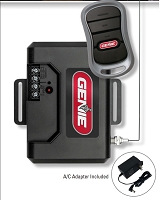
Do I need the opener model number or the receiver model number to match a remote?
You should collect both numbers, but the receiver model is usually the final compatibility authority. The opener model helps identify the operator family, control board, and original radio system. The receiver model confirms what remote signal the system actually accepts, including frequency, code family, learn method, and button-channel behavior.
The Short Answer: Bring Both Numbers When Possible
The opener model number and receiver model number answer different questions. The opener model identifies the gate operator or garage door opener platform. It can point to the original manual, control-board generation, voltage system, accessory terminals, and factory radio option. The receiver model identifies the radio hardware that listens for the remote.
For many garage door openers, the receiver is built into the opener logic board. In that case, the opener model, learn button color, antenna color, and manufacture date may be enough to identify compatible remotes. For many gate operators, the receiver is often separate, upgraded, or added externally. In those cases, the receiver model is usually more important than the operator model.
Why the Receiver Model Often Matters More
A remote does not communicate with the motor directly. It communicates with a radio receiver. The receiver then tells the gate operator or garage opener to activate through the proper control logic. If the remote does not match the receiver’s frequency and code family, the system may ignore the signal even if the opener model looks correct.
This is common on driveway gates. A LiftMaster, Linear/Nice, DoorKing, Viking, HySecurity, FAAC, Nice/Apollo, Mighty Mule, or GTO PRO operator may have a receiver from a different brand. The original receiver may have been replaced to add more transmitter capacity, support newer remotes, work with a gated community access system, or match a garage door remote family.
When the Opener Model Number Is Enough
The opener model number may be enough when the opener still uses its original built-in receiver and the radio generation is clearly identified. This is often true with residential garage door openers where the learn button color, antenna wire color, and model label are visible.
For many LiftMaster, Chamberlain, and Craftsman garage openers, the learn button color is a major compatibility clue. Green, red/orange, purple, yellow, and white learn-button systems represent different radio technologies and accessory generations. Genie and Overhead Door systems may require Intellicode, CodeDodger, or older DIP-switch matching depending on the opener generation.
When the Receiver Model Number Is Required
The receiver model number becomes critical when the radio hardware is separate from the opener. Look for an external receiver box near the gate operator, a plug-in receiver module, a receiver card, an antenna wire leading into a small enclosure, or a receiver connected to a telephone entry or access-control panel.
If the receiver brand does not match the opener brand, match the remote to the receiver. A gate operator cover may say one brand while the receiver label identifies a completely different transmitter family. The remote must match the installed receiver’s frequency, code format, memory logic, and programming method.
Technician’s Corner
Technical Field Note: The Operator Label Can Be Technically Correct but Radio-Wrong
The opener model may correctly identify the motor and control board, but it may not identify the current radio receiver. A gate operator can be mechanically original while its receiver has been changed more than once over the life of the system.
Technical Field Note: Learn Button Color Is a Receiver Clue
On many garage openers, the learn button is part of the receiver identification process. If a logic board was replaced, the current learn button color may matter more than the original manual that came with the opener.
Technical Field Note: South Florida Weather Can Hide Receiver Problems
In Miami, Hialeah, Hialeah Gardens, Doral, Kendall, Homestead, and coastal South Florida areas, humidity, salt air, heat, storms, and lightning activity can damage antenna connections, receiver boards, and low-voltage terminals. A remote mismatch may actually be a weak or damaged receiver.
Technical Field Note: Access-Control Systems Add Another Layer
Condo, HOA, apartment, warehouse, and secured parking gates may use receiver credentials, facility codes, block coding, or managed transmitter enrollment. In those systems, the receiver or access-control panel information is more useful than the gate operator model alone.
Before You Match This Hardware
- Record the opener brand, model number, and manufacture date.
- Record the receiver brand, model number, and frequency.
- Check the existing remote part number, FCC ID, and button count.
- For garage openers, identify the learn button color and antenna color.
- For gate systems, determine whether the receiver is built-in, plug-in, external, or tied to access control.
- Confirm the code family: DIP switch, rolling code, encrypted, Security+, Security+ 2.0, Security+ 3.0, MegaCode, Multi-Code, MicroPLUS, MicroCLIK, Intellicode, or CodeDodger.
- Check whether the receiver memory is full or managed by an administrator.
- Verify whether each button on a multi-button remote can be assigned to the intended receiver.
What If You Cannot Find the Receiver Model?
If the receiver model is not visible, start with photos of the opener label, control box, antenna wire, existing remote, battery compartment, and any small receiver enclosure near the operator. For garage openers, include the learn button area. For gate systems, include the accessory wiring area only when it can be accessed safely and with proper authorization.
If the remote is for a community gate, do not assume the correct transmitter will work immediately. The property may require transmitter enrollment, credential approval, or facility-code matching before the remote is active.
Related Technical Categories
- Gate and Garage Remote Controls
- LiftMaster Remote Controls
- Garage Door Remote Controls
- Gate Opener Receivers
- Garage Door Opener Circuit Boards
- Access Control Replacement Parts
Final Compatibility Advisory
Before selecting a replacement remote, verify the opener model number, receiver model number, existing remote part number, frequency, code family, learn-button color, antenna color, button assignment, programming method, operator generation, and access-control requirements. If receiver hardware is being replaced, also verify voltage, relay type, terminal function, connector style, and enclosure protection.
Tagged Products


