
I manage an HOA, apartment property, or commercial gate. How do I replace the receiver without disabling every resident's remote?
To replace an HOA, apartment, or commercial gate receiver without disabling every resident’s remote, identify the active receiver, document all transmitter credentials, verify memory-transfer or individual re-enrollment options, and choose a replacement receiver that supports the existing remote family. Do not remove the old receiver until the replacement plan, capacity, channel assignments, and access records are confirmed.
Start by Identifying the Active Receiver
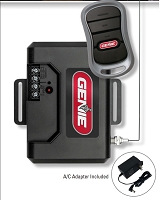
At managed properties, the gate operator model alone is not enough. The receiver controlling the remotes may be external, integrated into the control board, mounted in an access-control enclosure, or connected to a telephone entry or card-access system.
Open the operator or control enclosure and identify the actual receiver that responds to resident remotes. Record the receiver manufacturer, model number, frequency, code family, channel count, antenna type, power input, and relay wiring. Photograph the receiver label, terminal strip, antenna connection, and any programming display before touching the wiring.
Older properties often contain abandoned radio equipment from previous upgrades. A disconnected receiver may still be mounted in the cabinet while a newer receiver actually controls the gate. Trace the receiver output to the operator input before programming, erasing, or replacing anything.
Do Not Assume Remote Memory Will Transfer
Most replacement receivers do not automatically inherit the old receiver’s programmed remotes. If the existing remotes are compatible with the new receiver, they may still need to be enrolled again. If the new receiver uses a different radio family, the old remotes may not work at all.
Some commercial receiver platforms have backup memory modules or data-transfer features, but those features are model-specific. A basic learned-code receiver should not be assumed to transfer resident credentials from the old receiver.
This is why the replacement process must start with the credential population. Count active remotes, spare remotes, management remotes, maintenance remotes, employee remotes, vendor remotes, and any remotes assigned to emergency or service access. For an HOA or apartment gate, the access list is part of the hardware match.
Match the Replacement Receiver to the Existing Remote Family
If the goal is to keep residents’ existing remotes, the replacement receiver must support the same frequency and exact code format. Frequency alone is not enough. MicroClik, MicroPlus, MegaCode, Security+ 2.0, DIP-switch, rolling-code, and other systems use different radio logic.
A receiver can be electrically compatible with the gate operator and still be radio-incompatible with the residents’ transmitters. The operator may only see a dry-contact relay command, but the receiver still has to recognize the remote codes.
If the old remote family is discontinued, insecure, undersized, or impossible to manage individually, the better path may be a planned receiver-and-remote conversion. In that case, the old remotes are retired intentionally, and residents receive new compatible remotes assigned under the new system.
Technician's Corner
Technical Field Note: Keep the Old Receiver Active During Transition When Appropriate
For a managed property, the old receiver may need to remain active until the new receiver is tested, programmed, and residents are issued working credentials. Do not disconnect the old radio path until the transition plan is ready. If the goal is to revoke old remotes, however, the old receiver must eventually be removed from the operator command input.
Technical Field Note: Individual Deletion Requires Recordkeeping
A receiver that supports individual deletion is only useful if each transmitter ID is recorded. Track remote ID, resident or employee name, unit number, vehicle, issue date, receiver channel, and button function. Without records, a lost remote may force a larger reset than necessary.
Technical Field Note: Channel Capacity Can Be the Hidden Limitation
A receiver may have enough total memory but limited capacity on the channel being used. Channel 1, Channel 2, and Channel 3 may not share identical memory limits. Verify the channel that actually triggers the gate, not only the receiver’s headline capacity.
Technical Field Note: South Florida Cabinets Need Extra Inspection
Humidity, salt air, storm moisture, insects, and surge exposure can corrode antenna fittings, low-voltage terminals, and receiver power wiring. A receiver change can fail if the new radio is connected to unstable power, damaged coax, or a corroded operator input.
Plan for Individual Add, Delete, and Lost-Remote Control
For an HOA, apartment, warehouse, or commercial entrance, receiver capacity is only one part of the decision. The receiver should also support the property’s access-management needs.
Important questions include: Can one remote be deleted without erasing everyone? Can a lost remote be blocked? Can remotes be added in blocks? Can the system identify transmitter numbers? Can management keep records by user or unit? Can memory be backed up before replacement?
A small receiver may operate the gate properly but still be the wrong choice for a property with many users. If residents change frequently, individual credential management may matter more than basic remote range.
Use a Parallel Test When the Operator Inputs Allow It
Where the operator supports a documented external receiver input, the new receiver can often be powered and tested before the old receiver is removed. This allows management to verify voltage, relay operation, channel assignment, antenna range, and remote programming with a small test group.
Do not tie two receiver outputs or two operator boards together by guesswork. Each receiver relay should connect to the proper documented input, such as RADIO OPEN, OPEN, CYCLE, or SINGLE BUTTON. If two radio systems are active during transition, confirm that both are intentionally connected and that old access will be retired when the changeover is complete.
Before You Choose a Replacement Part
- Identify the active receiver manufacturer, model, frequency, and code family.
- Record the gate operator model and control-board part number.
- Document every active remote type and transmitter ID where available.
- Confirm whether existing remotes must remain in service.
- Verify receiver memory capacity and channel-specific limits.
- Check whether individual deletion, blocking, block programming, or backup memory is supported.
- Verify receiver voltage, AC/DC type, polarity, and available accessory current.
- Trace relay outputs to the exact operator command input.
- Inspect antenna, coax, connector type, cabinet condition, and RF range.
- Plan resident communication, staged testing, and final retirement of old remotes if changing platforms.
Related Technical Categories
LiftMaster STAR1000 Commercial Receiver
Final Compatibility Advisory
Replacing a managed-property gate receiver without disabling every resident’s remote requires planning around radio compatibility, memory management, and operator wiring. Before selecting hardware, verify the operator model number, receiver part number, voltage, frequency, code format, antenna type, relay output, channel assignment, memory capacity, deletion method, backup option, and operator generation. Do not erase or remove the old receiver until the active remote population and replacement programming method are documented.
