
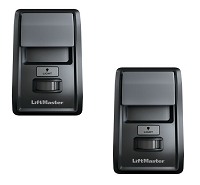
Can I install two wall consoles on the same gate or door operator?
Yes, two wall consoles can control the same gate or door operator when the control board supports multiple stations and both controls use the required interface. Simple dry-contact buttons may share an input, but powered digital consoles, wireless controls, and open-close-stop stations have different limits. Verify the operator manual before connecting them together.
The Answer Depends on the Wall-Control Interface
Two controls can be added successfully only when the operator is designed to recognize both devices. The first step is identifying whether the existing control is a basic dry-contact push button, a communicating residential wall console, a wireless control, or a commercial open-close-stop station.
These controls may all be wall mounted, but they do not use the same electrical logic:
- Dry-contact push button: briefly connects a command input to control common.
- Digital wall console: receives power and exchanges electronic commands with the logic board.
- Wireless wall console: communicates with the operator's internal or external radio receiver.
- Three-button station: provides separate OPEN, CLOSE, and STOP contact circuits.
Do not assume that a second control can be connected by placing matching wire colors under the same terminals. The operator model, installed board, wiring diagram, and permitted control quantity determine the correct arrangement.
Two Basic Dry-Contact Buttons May Be Wired in Parallel
When an operator has a documented momentary normally open push-button input, two compatible buttons can often share that input. The normally open contacts are commonly wired in parallel so pressing either button closes the same command circuit.
This arrangement may be used for a single-button, step-command, OPEN, or similar low-voltage input. Either station can then activate the operator from a different location.
Parallel wiring is appropriate only when the control-board manual permits multiple devices on that input. A second button can create problems if it is maintained instead of momentary, uses a powered output instead of an isolated contact, or is connected to the wrong common terminal.
Residential Digital Consoles May Have a One-Panel Limit
Many residential garage door wall consoles are not simple switches. They receive low-voltage power and communicate with the opener through a proprietary two-wire circuit. The same connection may carry commands for door movement, lighting, remote lockout, motion detection, programming, diagnostics, or timer functions.
Some operator generations allow only one primary wired multifunction console. Connecting a second powered console can place too much electrical load on the communication circuit or create conflicts between light, lock, timer, and programming functions. Other operator families may allow a specific secondary button, approved auxiliary console, or compatible wireless wall control.
The fact that both consoles have two terminals does not prove they can be connected together. Verify the operator model, logic-board generation, console part numbers, required polarity, and the manufacturer's permitted control combination.
A Wireless Secondary Console Uses the Receiver
A wireless wall console does not normally share the wired wall-control terminals. It is programmed to the operator's internal radio or to an external receiver.
This can be a practical way to add another control location when the operator does not support two wired digital consoles. Compatibility still depends on receiver frequency, code family, learn-button generation, programming method, and available receiver memory.
A wireless console may provide only selected functions. It might operate the door and lights but not duplicate every menu, diagnostic, timer, or lock feature available on the primary wired panel.
Gate Operator Push Buttons Commonly Share Command Inputs
Automatic gate control boards often accept multiple dry-contact activation devices. A wall button, key switch, receiver, keypad, telephone entry relay, or access-control panel may all connect to an OPEN or single-button input when the board supports that arrangement.
Normally open activation contacts are commonly placed in parallel. Any connected device can then close the circuit and issue the command. However, one stuck button, maintained relay, wet cable, or shorted conductor can hold the input active and affect every device connected to it.
A continuously active OPEN input may hold the gate open, reset the auto-close timer, or prevent closing. Multiple controls increase the number of cables, splices, and terminals that must be inspected when an input remains active.
Open-Close-Stop Stations Require Different Wiring
Two three-button stations cannot always be wired terminal-for-terminal in parallel. OPEN and CLOSE contacts are commonly normally open and may be connected in parallel when permitted. STOP contacts on many commercial door and gate systems are normally closed and may need to be wired in series.
Series wiring allows either STOP button to open the stop circuit. If normally closed stop contacts are incorrectly wired in parallel, pressing one STOP button may not interrupt the circuit because the other station still completes the path.
Control logic varies by manufacturer and operator generation. Some gate operators require a specific station, harness, selector-switch position, or stop-contact arrangement. Follow the exact operator diagram rather than applying a generic three-button wiring pattern.
Commercial Door Operators Often Support Multiple Stations
Commercial sectional, rolling, and industrial door operators commonly use controls at more than one location. Multiple stations may be installed for warehouse, loading-dock, security, or supervisory operation, but conductor count and station logic must match the board.
The operator may also use different control modes, including momentary open, momentary close, constant-pressure close, or open-close-stop operation. Adding another station does not change the programmed mode or bypass monitored photo eyes, sensing edges, hoist interlocks, emergency stops, or other required safety circuits.
Technician's Corner
One Defective Station Can Affect Every Other Control
When multiple devices share an input, a shorted cable or stuck contact at one location can make the other stations appear defective. Isolate each branch according to the operator wiring diagram before replacing the control board.
Longer Wiring Runs Add More Failure Points
A second station adds cable length, splices, conduit transitions, and terminal connections. High resistance may not affect a basic contact immediately, but it can disrupt powered or communicating consoles. Use the conductor type and maximum wiring distance specified by the manufacturer.
Normally Closed Stop Contacts Need Special Attention
A loose connection anywhere in a series stop loop can disable the operator. Inspect every stop contact, splice, and terminal when all stations have power but none will activate movement.
South Florida Conditions Can Create Shared-Circuit Faults
Humidity, salt air, wet conduit, wind-driven rain, insects, and corrosion can create intermittent commands or open stop circuits. Use an appropriate enclosure and protect exterior cable entries without trapping condensation inside the station.
Before You Add a Second Wall Console
- Record the complete operator model and installed control-board number.
- Identify whether the controls are dry contact, digital, or wireless.
- Verify the permitted number and combination of wall controls.
- Confirm normally open or normally closed contact logic.
- Check whether momentary, maintained, or constant-pressure control is required.
- Verify conductor count, polarity, connector type, and maximum wire length.
- For wireless controls, confirm frequency, code family, and receiver memory.
- Review monitored safety-device and operating-mode requirements.
- Follow the required control location and line-of-sight instructions.
Related Technical Categories
- Wall Consoles and Push Buttons
- Gate Operator Control Stations
- Commercial Door Three-Button Stations
- Wireless Wall Controls
- Access-Control Relays and Receivers
- Low-Voltage Wire and Connectors
Parts-selection advisory: Verify the operator model number, installed control-board generation, wall-console part numbers, voltage, wireless frequency when applicable, connector type, polarity, control quantity, NO/NC logic, and safety-device configuration before adding a second wall control.
Tagged Products


