
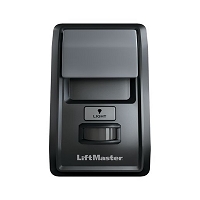
How do I know which wall console is compatible with my gate, garage door, or commercial door operator?
Match the wall console to the operator’s exact model, control-board generation, and required input type—not just the brand or number of wires. Residential garage openers may use proprietary two-wire digital controls, gate operators may accept dry-contact commands, and commercial door operators may require separate open, close, and stop circuits with specific operating logic.
Start With the Operator Type
The phrase “wall console” covers several electrically different devices. A residential garage door control panel, a gate control station, and a commercial overhead door station may look similar, but they do not necessarily send the same command.
- Residential garage door openers: commonly use a model-specific wired control panel or a compatible wireless wall station. The panel may provide door movement, light control, lock mode, programming, motion detection, diagnostics, or timer functions.
- Automatic gate operators: commonly use normally open dry-contact inputs for commands such as open, close, stop, single-button, fire access, or hold-open. Some gate models require a manufacturer-specific three-button station or a particular common-terminal arrangement.
- Commercial door operators: often use a three-button open-close-stop station. The operator’s control logic may require momentary or constant-pressure commands, and the stop circuit may be normally closed rather than normally open.
Do Not Match a Residential Console by Wire Count Alone
Many garage door wall controls connect with only two conductors, but that does not make them interchangeable. A basic push button may simply close a circuit, while a multifunction panel may communicate digitally with the logic board over the same two wires. Installing a simple doorbell-style button where a communicating control is required can produce no response, partial operation, flashing lights, or loss of programming features.
For LiftMaster and Chamberlain residential openers, the learn-button color and production generation are useful clues, but the operator model and parts diagram remain the final reference. Older wall buttons may be incompatible with yellow-learn-button Security+ 2.0 equipment, and newer Security+ 3.0 controls are identified for Security+ 3.0 operators only. Genie wall consoles also vary by electronics generation; Series II and Series III panels can share similar wiring while requiring different console electronics and polarity.
Gate Operator Stations Must Match the Input Logic
A gate wall station is usually selected by the control board’s terminal functions, not by radio frequency or garage-door learn-button color. Read the gate operator manual and identify whether the board provides:
- single-button or step command input;
- separate open, close, and stop inputs;
- normally open or normally closed command circuits;
- a shared common terminal;
- maintained-contact, momentary-contact, or constant-pressure operation;
- low-voltage accessory power, if the station includes lights, electronics, or key control.
A three-button gate station is not automatically universal. Some operator families use model-specific stations or different stop-circuit logic. Connecting a normally open stop button to a board expecting a normally closed circuit can leave the operator disabled. Connecting a maintained switch to an input intended for a momentary pulse can hold the command active and create unexpected behavior.
Commercial Door Operators Require Control-Function Matching
Commercial overhead, rolling, and sectional door operators may use open-close-stop stations, single-button stations, key stations, pull switches, radio controls, or floor-level programming controls. Compatibility depends on the operator’s logic type, monitored entrapment devices, wiring mode, and intended function.
Confirm whether the door uses momentary close, constant-pressure close, or a monitored safety system that permits unattended closing. A replacement station cannot override missing photo eyes, sensing edges, or other required entrapment protection. The operator manual may also specify conductor count, wire gauge, maximum control-wire distance, station enclosure rating, and whether multiple stations can be wired in parallel.
Before You Match This Hardware
- Record the complete operator model number and production date or serial range.
- Find the original wall-control or control-station part number, if available.
- Check the control-board terminal labels and the operator wiring diagram.
- Identify whether the device is wired, wireless, or connected through an external receiver.
- Verify command logic: dry contact, digital communication, polarity-sensitive two-wire, normally open, or normally closed.
- Confirm required functions such as light, lock, timer, diagnostics, open-close-stop, or constant-pressure control.
- Match the indoor or outdoor enclosure rating to the mounting location.
Technician’s Corner
Two Wires Can Carry More Than a Simple Switch Command
One of the most common replacement mistakes is assuming every two-wire console is a basic contact closure. Some residential panels exchange encoded or digital information with the opener. The correct voltage may be present at the terminals, yet the wrong panel will remain dead because the communication protocol does not match.
A Damaged Wire Can Make a New Console Look Defective
Staples driven through low-voltage cable, corroded splices, loose terminal screws, reversed polarity on a polarity-sensitive console, or moisture inside an exterior station can prevent operation. Test the existing cable before condemning the replacement control. In South Florida, humidity, wind-driven rain, salt exposure, and insects inside outdoor boxes are common causes of intermittent station faults.
Stop Inputs Are a Frequent Commercial and Gate-Control Trap
Open and close buttons are commonly normally open, while the stop circuit may be normally closed. If the stop loop is open because of incorrect wiring, a broken conductor, or the wrong contact block, the operator may appear completely unresponsive even though power and the control board are normal.
Extra Features Must Be Supported by the Operator
A motion sensor, timer-to-close menu, lock switch, status display, or light button only works when the operator logic board supports that feature. A higher-feature console is not necessarily backward-compatible with a basic or older operator.
Related Technical Categories
- Garage Door Openers
- Replacement Parts
- LiftMaster Commercial Overhead Replacement Parts
- Gate Operator Control Stations
- Wall Consoles and Control Panels
Parts-selection advisory: Before selecting a replacement wall console or control station, verify the operator model number, original part number, control-board generation, voltage, frequency for wireless devices, connector or terminal type, contact logic, and required safety-device configuration. Two controls that look alike may not be electrically interchangeable.
Tagged Products


