
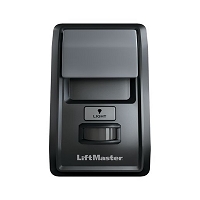
What is the difference between a wall console, a three-button station, and a control panel?
A wall console is usually a user control for a residential garage opener, while a three-button station provides separate open, close, and stop commands for many commercial door or gate operators. A control panel is a broader term that may describe either a wall-mounted interface or the main electronic controller that processes inputs and operates the system.
Wall Console: A User Interface for Everyday Operation
A wall console is normally mounted where a user can operate a garage door, gate, or related automation system from inside a building. In residential garage applications, it often combines a large door-movement button with additional functions such as opener-light control, remote lockout, motion-activated lighting, timer settings, programming, or system-status information.
The console does not usually switch the motor directly. It sends a low-voltage command to the operator's logic board. A basic wall button may create a momentary contact closure, while a multifunction console may receive power and exchange digital commands over the same two conductors. For that reason, two wall controls can look similar and use the same cable without being electrically interchangeable.
Wireless wall consoles are another category. They are mounted like a wired console but communicate by radio. Their compatibility follows the receiver's frequency, code family, and programming method rather than the operator's wired wall-control terminals.
Three-Button Station: Separate Open, Close, and Stop Commands
A three-button station is most commonly used with commercial overhead door operators and selected automatic gate operators. Instead of cycling one input through several movements, it provides dedicated OPEN, CLOSE, and STOP buttons. This gives the user direct command over the equipment and is useful where door or gate movement must be controlled deliberately.
The buttons are usually connected to low-voltage control-board inputs. OPEN and CLOSE are commonly momentary normally open contacts. STOP may use a normally closed circuit that must remain electrically complete during normal operation. These arrangements are not universal. Some operators use different terminal assignments, contact logic, or station types, so the operator wiring diagram remains the final reference.
A three-button station may also be configured for different operating modes. Depending on the operator and safety-device configuration, closing may be momentary, constant pressure, or permitted only when required monitored entrapment protection is present. The station cannot override missing photo eyes, sensing edges, interlocks, or other safety circuits.
Control Panel: A Term That Can Mean Two Different Things
Control panel is the most ambiguous term. In residential garage-door product listings, it may simply mean a wall-mounted multifunction console. In gate, commercial door, and access-control work, control panel often means the main enclosure or controller containing the circuit board, power supply, relays, communication modules, terminals, and programming controls.
The main control panel receives commands from wall stations, receivers, keypads, card readers, telephone entry systems, loop detectors, photo eyes, sensing edges, and other accessories. It then applies the programmed logic, checks safety inputs, and commands the motor or relay outputs. In that usage, the panel is not merely a button station; it is the decision-making electronics for the system.
Because the same term is used in both ways, always confirm whether a parts listing means a wall-mounted operator control or the primary controller assembly. Photographs, part numbers, terminal descriptions, and manufacturer documentation are more reliable than the product name alone.
How the Three Devices Differ Electrically
- Wall console: may use a simple dry contact, polarity-sensitive two-wire communication, or wireless radio transmission.
- Three-button station: normally provides separate contact circuits for open, close, and stop commands.
- Main control panel: supplies power, monitors inputs, processes programming and safety logic, and controls operator outputs.
The wall console and three-button station are command devices. The main control panel is the device that interprets those commands. Replacing one does not automatically correct a problem in another. A working station cannot overcome a failed control-board input, and replacing a control board will not repair an open cable or damaged button contact.
Which Device Is Used With Each Operator Type?
Residential Garage Door Openers
These systems commonly use a basic wall button or a model-specific multifunction wall console. Compatibility can depend on the opener model, manufacturing range, logic-board generation, polarity, and supported features. Wireless wall consoles must also match the built-in or external receiver.
Commercial Door Operators
Commercial sectional, rolling, grille, and industrial door operators frequently use open-close-stop stations. Single-button stations, key stations, pull switches, radio controls, and programmable control panels may also be available. The correct device depends on the operator's control mode, duty application, terminal logic, and entrapment-protection setup.
Automatic Gate Operators
Gate operators may accept a single-button station, three-button station, key switch, receiver, keypad, or access-control relay. Some three-button stations are restricted to specific operator families. A gate operator's internal controller is also commonly called its control board or control panel.
Access-Control Systems
In access control, the control panel is typically the central controller that accepts credentials and input signals, then activates relays for gates, doors, locks, or commercial operators. A wall station may provide manual control, but it does not replace credential management, schedules, audit functions, supervised inputs, or multi-door control.
Technician's Corner
A Large Button Does Not Identify the Circuit Type
A residential digital console and a basic momentary push button can both have one large door button. Test and identify the circuit by model and documentation, not by appearance or conductor count.
An Open Stop Circuit Can Disable the Entire Operator
On systems using a normally closed stop loop, a broken conductor, corroded contact block, loose terminal, or incorrect replacement station can prevent every movement command. The operator may have normal power but appear unresponsive.
Outdoor Stations Need Environmental Protection
Indoor stations are not automatically suitable for gate columns, exterior walls, washdown areas, or humid commercial sites. In South Florida, rain intrusion, condensation, salt air, insects, and terminal corrosion can cause intermittent commands or a permanent open stop circuit. Match the enclosure rating and sealing method to the location.
The Control Panel May Have Been Replaced
An older operator can contain a newer replacement controller. In that case, accessory compatibility may follow the installed board revision rather than the original operator production date. Verify both identifiers before matching a wall console or station.
Before You Match This Hardware
- Record the complete operator and control-board model numbers.
- Determine whether the listed control panel is a wall interface or the main controller.
- Identify wired dry contact, digital communication, or wireless radio operation.
- Verify terminal functions, conductor count, polarity, and contact logic.
- Confirm whether STOP must be normally closed.
- Check momentary, maintained, or constant-pressure operating requirements.
- Verify the indoor or outdoor enclosure rating.
- Confirm monitored safety-device requirements before changing closing controls.
Related Technical Categories
- Garage Door Openers
- Replacement Parts
- Gate and Garage Door Receivers
- Wall Consoles and Control Panels
- Commercial Door Control Stations
- Gate Operator Control Accessories
Parts-selection advisory: Verify the operator model, installed control-board number, voltage, wireless frequency when applicable, connector type, terminal arrangement, polarity, contact logic, enclosure rating, and operator generation before selecting a wall console, three-button station, or control panel. Similar names and housings do not establish compatibility.
Tagged Products


