
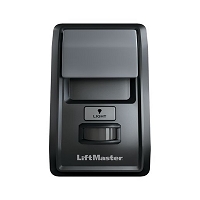
Why does disconnecting the wall console stop my gate or garage door from opening by itself?
Disconnecting the wall console stops unexpected opening because the operator is no longer receiving commands through that control branch. The likely source is a stuck console button, shorted low-voltage cable, wet or corroded connection, failed electronic console, or accessory relay holding the input active. The operator and radio receiver may still be functioning normally.
What the Disconnection Test Actually Proves
When the random opening stops after the wall-control circuit is disconnected, the fault is probably somewhere between the operator’s wall-control terminals and the disconnected device. That path includes the console, push button, cable, splices, junction boxes, connectors, and any relay or interface connected to the same input.
The result does not immediately prove that the console itself is defective. A damaged cable can intermittently close the command circuit even after the wall button is released. A wet splice can conduct just enough current to simulate a button press. On a digital two-wire console, unstable power or communication caused by corrosion or a damaged conductor can also produce abnormal commands.
A Shorted Wire Can Imitate a Button Press
Many basic garage door buttons and gate activation stations use a momentary normally open contact. Pressing the button briefly connects the command input to control common. If two conductors touch because of a tight staple, screw, crushed insulation, damaged junction, or loose copper strand, the control board can interpret the short exactly like a legitimate command.
On a garage opener using a single-button sequence, that false command may open a closed door, stop a moving door, or reverse the next movement depending on the operator state. On a gate operator, an intermittent short on OPEN, single-button, or free-exit can initiate an opening cycle. A continuous OPEN signal may also hold the gate open or repeatedly reset the automatic-close timer.
The Button or Console Can Fail Internally
A mechanical button can stick, develop pitted contacts, or become sensitive to vibration. The face may return outward while the internal contact remains closed or chatters intermittently. Multifunction consoles can develop a failed membrane switch, contaminated circuit board, damaged connector, or electronic fault that sends unintended commands.
A console that still lights up is not automatically good. The backlight or display can receive power while the movement switch or communication electronics malfunction. Likewise, LIGHT and LOCK functions may work even when the main movement button is failing.
Moisture and Corrosion Commonly Create Phantom Commands
Exterior gate stations, humid garages, underground conduit, and poorly sealed wall boxes are vulnerable to moisture. Water, salt deposits, corrosion, insects, and conductive debris can bridge low-voltage terminals. The resulting leakage may be intermittent, changing with rain, humidity, temperature, or vibration.
South Florida conditions make this failure pattern especially important. Wind-driven rain can enter a station or conduit, salt air can oxidize contacts, and lightning or surge exposure can damage one accessory input while leaving the motor and receiver operational. A system that opens randomly after storms should have its wall-control branch inspected before the control board is condemned.
Gate Accessories May Share the Same OPEN Input
The device called the wall console may not be the only item connected to that input. A gate operator’s OPEN or single-button terminal can also receive commands from a keypad, telephone entry relay, card reader, timer, intercom, receiver, fire-access interface, or building-control system.
If disconnecting the entire terminal branch stops the random opening, any device or splice on that branch can be responsible. A relay programmed for maintained or toggle operation, rather than a short momentary pulse, can hold OPEN active. A stuck relay or incorrect common connection can create the same symptom as a failed wall station.
Digital Garage Consoles Need a Different Diagnostic Approach
Some residential garage wall controls do not use a simple dry contact. They receive low-voltage power and exchange coded commands with the opener over two conductors. Shorting those terminals is not an appropriate test unless the exact operator documentation identifies a supported jumper procedure.
For a communicating console, diagnosis should focus on the correct console generation, polarity, stable low-voltage wiring, connector condition, and an approved short-cable isolation test. A console from the wrong electronics generation may power up yet communicate incorrectly or fail unpredictably.
How to Separate the Console From the Wiring
The location of the disconnection matters:
- Console removed but field wires remain connected at the operator: if random operation stops, the console is a strong suspect, but inspect the exposed wire ends for movement or accidental contact.
- Wall-control wires removed at the operator: the problem is isolated to the console, field cable, splices, or connected accessories, but those parts have not yet been separated from one another.
- Correct console works through a short, known-good temporary cable: the original field wiring or its terminations are defective.
- Known-good compatible console still produces false commands on a short cable: verify board configuration and the wall-control input circuit before selecting a replacement board.
Use only the isolation procedure approved for the exact operator. Do not place jumpers across digital communication, accessory-power, monitored safety, or line-voltage terminals.
Technician’s Corner
Watch the Input Indicator Before Replacing Parts
Many gate and commercial boards have an LED for OPEN, single-button, or another command input. If that LED flickers or turns on without a valid command, the board is seeing an active field input. Disconnect branches individually according to the wiring diagram to locate the source.
A Remote Problem Becomes Less Likely, Not Impossible
If disconnecting the wall-control branch consistently stops the issue, radio interference, a stuck handheld remote, and receiver-memory problems become less likely. Continue observing long enough to rule out coincidence before deciding which component failed.
Do Not Leave Required Controls Disconnected Permanently
A temporary isolation test is not a final wiring configuration. Restore the system only with compatible controls, intact STOP and interlock circuits, and all required entrapment-protection devices connected as specified.
Before You Choose a Replacement Part
- Record the operator model and installed control-board number.
- Identify the wall-console or station part number.
- Determine whether the circuit is dry contact or coded communication.
- Check polarity, terminal labels, NO/NC logic, and pulse or latch mode.
- Inspect cable staples, splices, conduit, connectors, and wall boxes.
- Check for moisture, corrosion, insects, and surge damage.
- Identify every accessory sharing the same command input.
- Use only the documented short-cable or branch-isolation procedure.
Related Technical Categories
- Wall Consoles and Push Buttons
- Gate Operator Control Stations
- Control Boards and Logic Boards
- Low-Voltage Wire and Connectors
- Receivers and Wireless Controls
- Access-Control Relays and Interfaces
Parts-selection advisory: Verify the operator model number, installed control-board generation, console part number, voltage, wireless frequency when applicable, connector type, polarity, terminal function, contact logic, and operator generation before selecting replacement hardware.
