
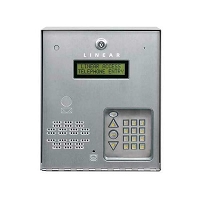
How do I know if a telephone entry system is compatible with my existing gate operator?
A telephone entry system is compatible with an existing gate operator when it can send the correct relay command to the operator input without conflicting with power, safety, communication, or access-control wiring. Match the relay output, input terminal function, voltage, control logic, user requirements, and enclosure fit before selecting replacement hardware.
Compatibility Starts at the Gate Operator Input
Most telephone entry systems do not control the gate motor directly. They authorize a visitor, resident, tenant, or manager command, then close a relay contact. That relay signal is sent to the gate operator control board, where it is interpreted as an open, cycle, radio, key, or access command.
This is why the telephone entry system does not always need to match the gate operator brand. The important question is whether the entry system can provide the type of dry-contact relay signal the operator expects. In many installations, that means a momentary normally open contact between common and an open-style input. Still, the operator manual and terminal labels should be checked before assuming the input logic.
Identify the Existing Gate Operator First
Before choosing a telephone entry replacement, record the gate operator brand, model number, control-board number, voltage, and input terminal labels. Look inside the operator cabinet for terminals marked open, single button, radio, key, cycle, access, common, exit, safety, shadow, stop, close, or fire.
The same entry system relay can behave differently depending on which operator input it lands on. A normal open command may trigger a timed cycle. A hold-open input may keep the gate open while the relay is held. A close input may not be appropriate for visitor access. A safety or reverse input should not be used as a normal access command.
Check the Telephone Entry Relay Output
Next, check the output side of the telephone entry system. Most access systems provide relay terminals labeled COM, NO, and sometimes NC. COM means common. NO means normally open. NC means normally closed. For many gate operators, the typical access command uses COM and NO, but some lock hardware, alarm circuits, or special control sequences may use different logic.
Also confirm whether the relay is momentary or latching. A momentary relay closes briefly to start a gate cycle. A latching relay stays closed for a programmed period or schedule. If a latching relay is wired into the wrong input, the gate may stay open, fail to close, or behave like a timer problem.
Do Not Confuse Relay Wiring With Reader Wiring
A common compatibility mistake is treating every low-voltage terminal as the same type of connection. A card reader or fob reader may use Wiegand, OSDP, or another data format. That wiring sends credential information to a controller. It does not replace a dry-contact relay output to the gate operator.
Likewise, a radio receiver may provide a simple relay closure or may send credential data to an access-control controller. If the property needs individual remote-user tracking, schedules, or credential deletion, verify whether the receiver is acting as a stand-alone relay device or as a managed access-control device.
Power Compatibility Is Separate From Relay Compatibility
A telephone entry system can be relay-compatible with the gate operator and still require a separate power supply. Do not assume the gate operator accessory power output can run a modern telephone entry panel, cellular module, touchscreen, video unit, card reader, or lock relay board.
Verify whether the entry system requires AC, DC, PoE, or a model-specific transformer. Confirm voltage, VA, wattage, amperage, polarity, grounding, surge protection, wire distance, and battery backup. A low-capacity or wrong-voltage supply can cause screen resets, relay chatter, weak audio, failed cellular communication, or intermittent gate release.
Communication Method Does Not Prove Operator Compatibility
Cellular, internet-based, VoIP, and landline telephone entry systems can all work with gate operators when their relay output is correct. The communication method controls how the visitor call, app command, directory, video, or cloud programming reaches the system. The gate operator still needs the correct open command at the control board.
This distinction matters when replacing an older landline call box with a cellular or IP-based entry system. The communication platform may change completely, but the gate-side connection may still be a simple relay pair. Verify both halves separately: communication on one side and gate command logic on the other.
Technician’s Corner
Relay Click Does Not Always Mean Compatibility Is Complete
If the entry system relay clicks but the gate does not move, the issue may be an active safety input, bad common wire, loop detector hold, low operator battery, stop circuit, blown accessory fuse, or incorrect input terminal.
South Florida Moisture Can Create False Compatibility Problems
Rain, humidity, salt air, and sprinkler exposure can corrode relay terminals and common wires. A compatible replacement panel can still fail if the underground conduit, pedestal wiring, or operator terminal strip has moisture damage.
Dual Gates May Need More Than One Output
A single driveway gate may need one relay. A dual swing gate, pedestrian gate, lobby door, or separate delivery entrance may require multiple relays, expansion boards, or separate access-control outputs.
Safety Devices Still Control Movement
A compatible telephone entry system can request the gate to open, but it does not override monitored photo eyes, edge sensors, loop detectors, stop circuits, or operator fault logic. Safety-device requirements must be checked against the operator configuration.
Before You Match This Hardware
- Record the telephone entry system model number, board number, relay labels, and power requirement.
- Record the gate operator model number, control-board number, voltage, and input terminal labels.
- Confirm whether the operator opens from another device such as a remote, keypad, loop, or push button.
- Verify whether the entry system relay output is dry contact, powered output, normally open, normally closed, momentary, or latching.
- Confirm which operator input should receive the access command.
- Check whether one relay is enough or whether the site needs multiple gates, doors, locks, or hold-open outputs.
- Verify power requirements separately from relay wiring.
- Confirm safety devices, loop detectors, stop circuits, and operator faults before blaming the entry system.
Related Technical Categories
- Telephone Entry Systems
- Cellular Access Control Equipment
- Access Control Keypads and Readers
- Access Control Power Supplies
- Gate Opener Circuit Boards
- Radio Receivers
- Vehicle Detection and Loop Detectors
- Safety Photo Eyes and Edge Sensors
Final Compatibility Rule
A telephone entry system is compatible with a gate operator when the entry panel can provide the correct relay command, the operator has a usable input, the power system is properly sized, and the safety/access-control layout is preserved. Before selecting replacement hardware, verify model number, part number, voltage, frequency, relay output, connector type, credential format, communication path, enclosure fit, safety inputs, and operator generation.
Tagged Products


